Google pixel phone review

Google pixel phone review
                        Google pixel phone
                                            Image result for google pixel phone

PROS

  • Stunning camera
  • The best version of Android
  • Good size for one-handed use
  • Super fast
  • CONS

    • Expensive
    • Back panel prone to scratches
    • Would like more storage option
    • KEY FEATURES

      • 5-inch, 1080p display
      • Snapdragon 821
      • 4GB RAM
      • 32 or 128GB storage
      • Android 7.1
      • Google Assistant
      • Pixel Launcher
      • 12MP and 8MP cameras
      • USB-C and fast charging
      • 2,770 mAh
      • Headphone jack...
      • Daydream VR ready
      • Manufacturer: Google
      • Review Price: £599.99

GOOGLE PIXEL – DESIGN

The least exciting part about the whole idea of the Google Pixel is its design. I know many people who dislike it completely, but I find it perfectly serviceable. It isn't as flashy as Samsung's Galaxy S7 but it's much nicer than than the latest batch of iPhones.
The body is made from metal and glass – pretty much a given these days – and it tapers down ever so slightly on the rear to help avoid any unnecessary camera bumps. A circular fingerprint sensor sits below the camera sensor, and both are encased in a divisive glass panel that runs about a third of the way down the back.
Image result for google pixel phoneImage result for google pixel phone
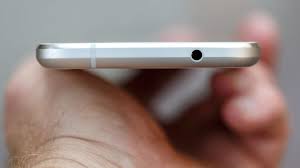
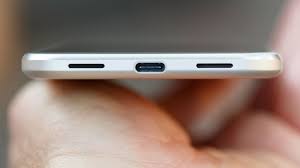
Unlike Apple, Google includes a 3.5mm headphone jack – but I’d have preferred for it to have been placed at the bottom rather than the top of the phone. In addition, Google has used a wide bezel above and below the screen – just like the iPhone. It would have been good to see this space used for a pair of front-facing speakers – maybe this will come with the Pixel 2.
The sides are heavily chambered, and this helps the device to fit comfortably in your hand. This is one of the easiest phones to hold, helped by the fact it isn’t overly thin.
It’s also completely usable in one hand, something that can’t be said for the larger Pixel XL. It’s roughly the same size as an iPhone 7, just a little taller and marginally thicker

GOOGLE PIXEL – DISPLAY

5-inch displays are becoming a rarity in the Android space, but for many they provide the perfect mix of portability and size. However, the problem – aside from the dearth of choice – is that smaller phones tend to be hamstrung by weak components and a lack of features.
Thankfully, this isn’t the case here. This is a 5-inch display phone with the innards of a larger device – and that’s great news.
The Pixel's display is fantastic, comfortably one of the best at this size. It’s an AMOLED panel – the same tech Samsung uses on its Galaxy series – with a 1080p resolution. This isn't as high as the larger Pixel XL and its quad-HD panel, but due to its smaller size you really won’t notice the difference.
It’s pin-sharp with zero jagged edges around icons when you’re looking at it from a normal distance. Get right up close, with your eye almost touching the screen, and you might notice a tiny bit of pixel-ation around the battery icons and on-screen buttons. Realistically, though, you won't be using the phone from such a distance.

GOOGLE PIXEL – PERFORMANCE

The Google Pixel is a seriously fast phone, probably the snappiest Android handset on the market for general use – and even creeping up on the iPhone 7.
Part of this is clearly down to the combination of the Snapdragon 821 processor and 4GB of RAM, but the real success here is a result of how it's all been optimised.
The Samsung Galaxy S7 is fast, as is the HTC 10 and OnePlus 3 with its 6GB of RAM, but random slowdown and strange behaviour is still commonplace in all those handsets. This isn’t the case with the Google Pixel: from opening apps, to scrolling through Chrome and playing games, it just feels right. It feels like it should; it feels like an iPhone.
It’s just another nail in the coffin of the traditional benchmark tool, as in most areas it falls behind the competition it actually bests. In Geekbench 4 its 4,079 multi-core score falls short of the Samsung Galaxy S7’s 5,481, while in 3D Mark’s IceStorm Unlimited the Pixel’s 27,453 can’t match the iPhone 7's 37,349.
Gaming performance is great, although intensive titles still load up quicker on the iPhone 7 initially. Once you’re in the game you won’t notice the difference, with loading times thereafter speeding up and no sign of any dropped frames.
Wi-Fi performance seems a little weaker than the larger Pixel XL model, but phone call and microphone quality remains excellent. The downward-firing speaker is loud and isn't at all bad considering its meagre size, but its position means it’s easily blocked when you’re watching YouTube videos.
The base storage option is 32GB, but 128GB is also available. It would have been better had Google started the range at 64GB, but I assume it wants you to pay a premium – and you’re less likely to do that with 64GB. Since there’s no expandable storage, you’ll have to choose wisely.
Following a few weeks of use I have 9GB free on my 32GB model, which I can see filling up quickly. However, an extra £100 for 128GB is still very expensive.


HTC 10 review

HTC 10 review
                                  HTC 10
                                                    Image result for htc 10

PROS

  • Iconic design
  • Fantastic version of Android
  • Great audio quality
  • Best selfie camera on the market
  • Really fast charging

CONS

  • Some camera niggles
  • Slight pinkish tinge to the display

KEY FEATURES

  • 5.2-inch quad-HD display
  • Snapdragon 820
  • 4GB RAM
  • 32/64GB internal storage
  • USB-C
  • 3,000 mAh battery
  • Android 6.0.1 & Sense 7.0
  • 12 UltraPixel camera w/OIS
  • 5 UltraPixel selfie camera w/OIS
  • Manufacturer: HTC
  • Review Price: 569.99

STILL ONE OF THE BEST PHONES AROUND

The HTC 10 has stood the test of time remarkably well. After months of use I haven’t had any serious issues with the phone.
Unlike competing phones, like the Huawei P9, the HTC 10 remains lightning fast. Games open in a matter of seconds and run chug- and stutter-free and I’m yet to have a serious software crash.
Battery life has slightly deteriorated, but not as much as I’d expected. The HTC 10 still easily lasts a full day off one charge and I regularly manage to eek out two days with light use.
The camera is still a slight annoyance, but only because I’ve experienced the majestic awesomeness of the Galaxy S7 – which still has the best phone camera sensor on the market.
The HTC 10’s camera isn’t bad, but the use of Ultrapixel tech, which instructs the camera to capture bigger pixels and more light, works a little too well. Photos taken in even moderately bright lighting conditions are regularly washed out and have unwanted flare effects. Careful use can get around the issue, however, and I’m still more than happy to snap memento shots of meetups with friends.
However, the phone’s biggest selling point remains its advanced audio qualities. HTC’s been leading the mobile audio market for quite some time and the 10 cements its position as the best phone maker for music fans.
Putting aside the phone’s Boomsound speakers that, while above average, are only useful to cretins that insist on using their phone to listen to music outloud, the HTC 10’s standalone headphone amp is its best feature.
The HTC 10 uses a dedicated DAC as well as headphone amp. HTC claims the 10’s amp is twice as powerful as competing phones, and after a few months with the phone I believe it. The HTC 10 consistently delivers superior audio quality to competing phones, including the Galaxy S7, LG G5 (without its add on DAC), OnePlus 3 and Huawei P9 on a variety of genres.
Everything from heavy metal, punk, prog and jazz sounds fuller and better balanced on the HTC 10 and it’s a key reason the 10 remains my handset of choice, even though it falls behind its archrival, the Galaxy S7, in other areas.

WHAT IS THE HTC 10?

After the frankly awful HTC One M8, the Taiwanese brand went back to the drawing board and, well, it worked. The HTC 10 more than matches up to the iPhone 6S in looks, and it doesn’t fall behind the Samsung Galaxy S7 when it comes to specs.
With its sloping curves, aluminium body and clean front, the HTC 10 is one of the best looking phones on the market, but with the iPhone 7 and Samsung Galaxy Note 7 coming soon is it still worth buying?

HTC 10 – DESIGN

While the HTC 10 takes the brand’s flagship smartphone in a new design direction, it’s still very familiar. The front is stripped from the One A9, and the back is a tweaked and tuned version of the rear casing from the One M9.
It’s far from original and looking at it face-on you’d be forgiven for confusing it with an iPhone or Samsung Galaxy S7, but for me it’s the perfect mix of style and substance.
First off, this phone is clearly made from metal – and proud of it. The back is cool to the touch, with an elegant curve that helps it sit comfortably in your hand. This curve flows into some heavily chamfered edges that add a bit of much-needed flair.
The camera sensor sits bang in the center, and while it doesn’t have what I'd consider a ‘hump’, it does jut out ever so slightly. Alongside it is an LED flash and a space for the laser auto focus system.
Like any metal phone, the sleek design is broken up by two bands of antenna lines that run around the top and bottom. These don’t stand out anywhere near as much as they do on the iPhone and they feel like part of the design, rather than something that has to be there.
Along the side you’ve got the usual combination of a volume rocker and sleep/wake button, the latter of which is beveled and easily identifiable even when the phone is in your pocket.
Most other phones have switched to a single tray that houses both the Nano SIM tray and a microSD card, but the HTC 10 still has one tray on each side. I’d like to see this combined to makes things sleeker, but it makes little difference in reality.
htc10 5

HTC 10 – SCREEN

HTC has updated just about every part of the One M9 for its successor, and the display is no exception.
It’s grown slightly to 5.2-inches, but the bigger upgrade is the resolution. It’s much more pixel dense now, thanks to the 2560 x 1440 quad-HD resolution, and it covers 99.9% of the sRGB colour gamut. It’s a mightily impressive panel, though as it's LCD – 5th-generation LCD, to be precise – it does lack a little of the vibrancy of Samsung’s Super AMOLED screen. It’s not far off, and it’s hard to notice unless you have both phones sat next to each other.


Galaxy S7 Review

Galaxy S7 Review
                               Galaxy S7  
                                                   Image result for galaxy s7

PROS

  • Stunning looks
  • Great camera experience
  • microSD slot and IP68 water resistance
  • Glorious display

CONS

  • Fingerprint magnet
  • TouchWiz still has some quirks
  • Poor speakers

KEY FEATURES

  • 5.1-inch, quad-HD display
  • 3,000mAh battery
  • 12MP camera
  • Fast and wireless charging
  • MicroSD
  • Android 6.0.1 Marshmallow
  • 4GB RAM
  • 5MP selfie camera
  • Exynos 8890 processor
  • Manufacturer: Samsung
  • Review Price: £569.00

SAMSUNG GALAXY S7 – DESIGN

After the massive, and much needed, change in design direction Samsung took with the Galaxy S6 and Galaxy S6 Edge in 2015, all rumors pointed to things staying pretty much the same for the Galaxy S7.
Well, it’s not like Apple, HTC or Sony make drastic changes to their industrial design every year.
And that’s exactly the case here. Place the Galaxy S7 next to the S6 and you’d be hard pushed to instantly pick which one is which. Frankly, this doesn’t bother me in the slightest. The S6 was already one of the best-looking phones around, and the Galaxy S7 follows suit.
Both the front and back are covered in Gorilla Glass 4, while a metal rim snakes in between. Two volume buttons sit on one side, with a lock/standby switch on the other. It’s a clean look, with the back free from any markings aside from a Samsung logo.
The camera lens now sits just about flush with the glass body too. This might seem a small change, but it makes a big difference. I can now tap out an email with the phone flat on my desk without it jumping and rocking from side to side.
Image result for galaxy s7
It’s an absolute fingerprint magnet, though. After a few minutes of use, the entire back becomes a grubby mess that needs wiping down with a microfiber cloth.
Along the top is the Nano SIM tray, which now holds a micro SD slot, plus a microphone. The bottom houses the headphone socket, another microphone, a speaker and a micro USB port for charging.
That speaker is one of the few missteps on this phone. It’s downward-facing, gets easily blocked by my hands when playing a game and it sounds tinny and distorted at high volume. I guess front-facing speakers weren’t included so the screen surround could be kept minimal, but it’s still a disappointment when a speaker sounds this bad.

SAMSUNG GALAXY S7 – DISPLAY

Close to perfection. That’s the best way to describe the display on Samsung’s Galaxy S7.
Not much has really changed from the outgoing S6, but this still holds up as the best screen on a smartphone.
It’s still a 5.1-inch QHD panel with a 2560 x 1440 resolution, and just like every Galaxy flagship so far, it uses Samsung’s Super AMOLED tech, rather than the more common LCD.
AMOLED displays are a lot better at showing off blacks than LCDs. Instead of looking slightly grey and washed out, the blacks here are inky deep. Some say AMOLED screens produce colors that are too over saturated, so reds will look way brighter than they should, but that isn’t much of an issue here. And if you really prefer things toned down, there’s a picture setting for that.
Having so many pixels jammed into a relatively small space means you can’t really spot one pixel from another, and that sharpness makes everything from gaming to watching YouTube an absolute pleasure. Play a round of Alto’s Adventure or Monument Valley on this display and you’ll instantly be drawn in by the crisp details and vivid color reproduction.
I wouldn’t normally watch a film on a screen this size, but the panel here is so gorgeous that I can’t help getting lost in it.
The one thing that has changed this time around is the addition of a new ‘Always-on’ display.
Due to the way AMOLED screens work, they don’t need to light up the whole display all of the time. They can select individual pixels and just show them, keeping everything else off. So, when the Galaxy S7 is locked it can still show the time, date and a couple of bits of other information on the screen without eating through too much battery.
It’s a nice touch, and great for quickly checking the time when the phone is resting on your desk or a bedside table. But it’s a good software update or two short of being really useful.
First off, it’ll only show notifications from a few apps – it’s currently limited to Samsung’s own Messages, Email and Phone. If you, like me, regularly use WhatsApp, Gmail and Facebook Messenger, none of these will appear. That’s a shame, and makes the notification side of things a lot less useful.
I’d also like a lot more control over the mode. There’s no setting to alter the brightness, which causes some problems when you’re in a darker room, and aside from choosing whether or not you want a calendar showing, there’s no customization allowed.

SAMSUNG GALAXY S7 – PERFORMANCE

After ditching Qualcomm and its Snapdragon line of CPUs for last year’s Galaxy S6, Samsung has decided to change its mind this time around. Well, sort of.
Snapdragon’s 2015 flagship chip, the 810, had a tough time with overheating, while the Exynos 7420, the Samsung-made silicon that powers the S6, soared to the top of our performance tables.
There are two versions of the Galaxy S7. In Europe, including the UK, it’s again powered by a Samsung Exynos chip. This time it’s the 8890, which consists of eight cores, with four running at 2.6GHz and the other four at 1.59GHz. It’s paired with a Mali T880 GPU.
In the US and a few other territories, it comes with Qualcomm’s Snapdragon 820. Both are seriously powerful chips, so don’t be concerned about which one you’re getting.

Apple watch 2 Review

Apple watch 2 Review
                          Apple Watch 2
                                                 Image result for apple watch 2

PROS

  • Bright, beautiful screen
  • Great fitness tracking
  • GPS makes it more versatile
  • Solid battery life
  • Snappy performance

CONS

  • Expensive
  • Looks the same as previous version

KEY FEATURES

  • 38mm or 42mm case
  • Built-in GPS
  • 50m water-resistance
  • Heart rate sensor
  • 1,000 nits OLED screen
  • Manufacturer: Apple
  • Review Price: £369.00

DESIGN

The Apple Watch Series 2 looks almost identical to the original, and I don’t mind that at all. This remains my favorite smartwatch when it comes to looks, particularly since it isn't as chunky as rival watches. It helps that I prefer square watches; those who prefer round ones might not be as kind.
The Watch 2 is a fraction thicker than the previous Watch, but not enough that you’d notice without seeing the two next to each other. The square screen with rounded glass edges make it simple to swipe up, down, left and right from the edge to provide additional shortcuts, and the rotating Digital Crown still works well as a method of zooming in and out, and general navigation.
The button just beneath the Digital Crown has been re-appropriated from a useless shortcut to contacts and on/off switch to a much more engaging way to scroll through the new apps dock (more details to follow).
You can opt for either the stainless steel or, slightly cheaper, aluminium chassis, and one of two sizes: 38mm and 42mm. The Series 2 is available in a range of colours: Gold, Rose Gold, Space Grey and Silver. This time there’s no expensive gold-plated model.
Instead, Apple has created a beautiful white ceramic smartwatch. The ceramic cast is treated at length at high temperature before it's polished smooth. Not only does it look super-attractive, it’s four times tougher than the stainless steel model.
Standing out from the crowd does come at a price, though. The ceramic Apple Watch Edition costs more than three times as much as the standard versions – the 38mm one setting you back a cool £1,249.
Suffice to say, it isn't necessary to spend such an amount for an Apple Watch that’s "tough". I’ve dropped my aluminium Apple Watch on several occasions and regularly whack it against door frames; it doesn’t have a single scratch on the screen or body.
The headline feature for the Apple Watch 2 is water-resistance. Not only will it survive a brief dunk in the bath, it's now fit for the sea. Apple claims it can withstand up to 50m of water – although we wouldn't advise that you go scuba-diving with it just yet. It’s meant to survive the rigors of arms swinging through water, as opposed to being plunged into the depths.
For those who intend to swim regularly with the Apple Watch 2 I'd recommend a Sports strap, rather than the metal or nylon straps. The Sports strap doesn’t retain any water, so you won't be left with a damp wrist all day after a brief plunge.
Image result for apple watch 2

SCREEN AND SPEAKER

The screen on the Watch 2 is the same size and resolution as the Watch, but it benefits from improvements. Apple claims this is the brightest screen it has ever made – and I can believe it; it can be viewed on the sunniest of days without issue.
As with any display of this size, there are limitations. It works as a touchscreen, of course, but also has benefits from Apple’s clever Force Touch technology, so you can access further options the harder you press. Note that this is the same "Taptic Engine" tech that featured in the first Apple Watch; it was improved to offer greater levels of sensitivity as Force Touch in later iPhone models.
The need to type is kept to a minimum – trying to input the PIN correctly to unlock it is tricky enough. Icons are easy enough to hit and swiping from the edges to access settings works well. Then there's watchOS 3's handwriting recognition, which is surprisingly handy in a pinch, too.
You can zoom in by tapping two fingers on the screen but I found this made the text too large to read, requiring me to scroll letter to letter in some apps.
The clever speaker is loud enough to comfortably have a conversation with someone while your hands are otherwise engaged. I’m not a huge fan of talking to my wrist, especially in public, but I found the speaker and mic just about strong enough for me to chat away outdoors with both hands on a pushchair.

 PERFORMANCE

There’s a brand-new processor in the Apple Watch Series 2, and it makes the smartwatch tick along more smoothly than ever.
I wasn't of the impression that the original Apple Watch was particularly sluggish, and its only on using the Watch 2 that I've come to realise how slow it was. Apps open quickly, with everything being a little more immediate. The biggest difference can be seen when switching between apps. You can now jump from your calendar to the Activity app in an instant.
It isn't just the new S2 processor that helps the Apple Watch 2's more snappy feel. The latest version of the Apple Watch operating system, watchOS 3, also plays a big role.

add